
Ditch the shoebox.
Scan a receipt. It names itself, files itself and lands in Xero. All on your phone.
DocketBox at a glance
- What it is
- A receipt and document scanner that files receipts for tax. For iPhone now, Android later.
- Price
- Free for 10 scans, then From US$9.99 once. No subscription.
- Privacy
- No account, no server, no ads. Your files stay on your phone.
- Countries
- Australia, US, UK, New Zealand, Canada, Ireland and Singapore.
- Made by
- AT Digital Co, Australia.
From crumpled docket to filed PDF in seconds
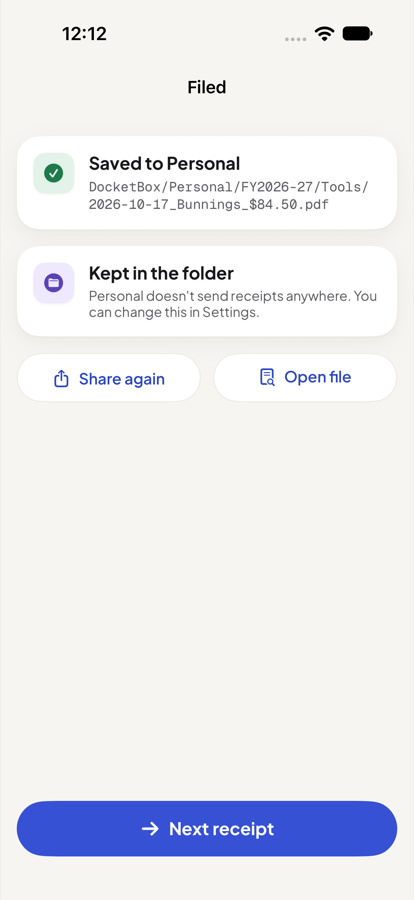
Scan a receipt and DocketBox does the boring part: it reads it, names it, files it and sends it. You just check and tap Save.
Scan it. It names itself.
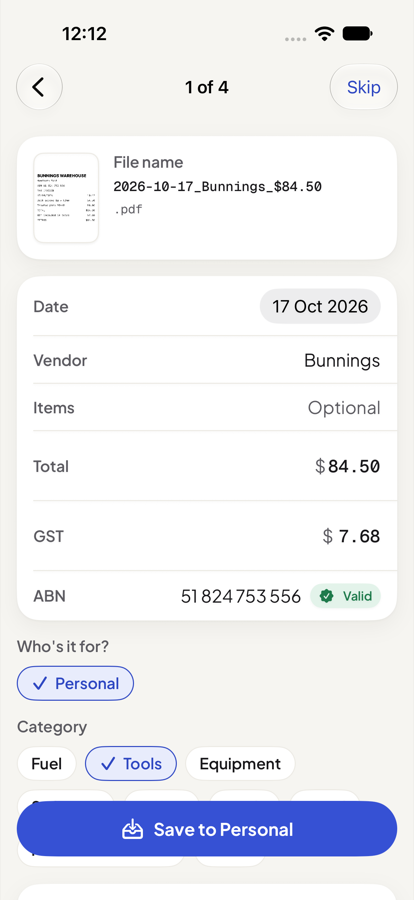
Point your camera at a receipt. DocketBox reads the date, shop, total, tax and supplier tax ID, and names the file so you can find it later.
- Clear names, like
2026-10-17_Bunnings_Deck-screws_$84.50.pdf - Scan a stack of receipts in one go and check each one
- Anything it isn't sure about is marked "Check this"
- Clear names, like
Filed for tax.
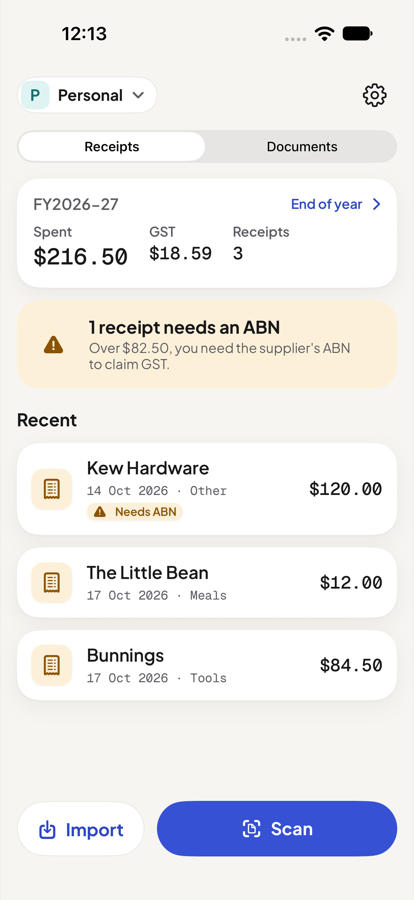
Every receipt goes into folders by business, financial year and category, as an ordinary PDF you can open in other apps.
- GST, VAT or sales tax checked against the total
- Receipts that need the supplier's ABN or VAT number are flagged
- Possible duplicates are flagged before tax time, not after
Straight to Xero, or your accountant.
Give each business a send-to address, such as your Xero bills inbox, and DocketBox emails each receipt as you save it.
- Works with Xero, QuickBooks, MYOB, Dext, or any email address
- Or keep receipts in the folder only
End of year in one tap.
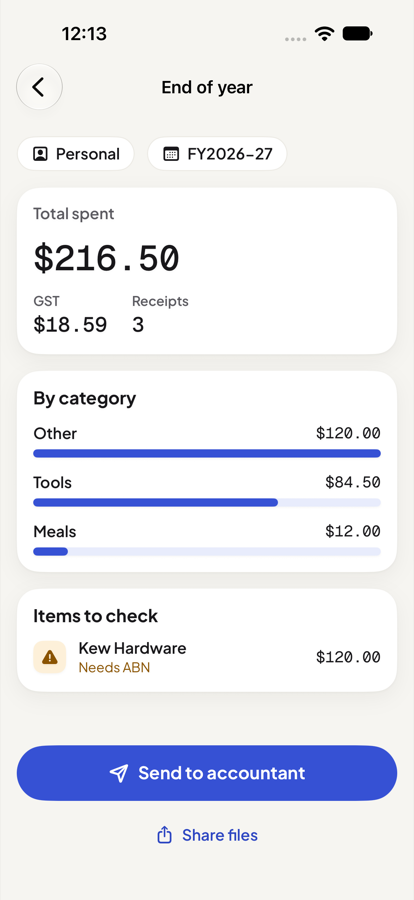
See the year's spending and tax by category, fix anything flagged, and send your accountant a spreadsheet and every PDF.
- A CSV that opens cleanly in Excel, Numbers or Google Sheets
- A zip of every receipt, in its folders
Every business. Its own box.
Run a business, a side hustle and a household? Keep them apart without thinking about it.
One box per business
Add each business and your personal receipts. Each gets its own folders, tax ID and send-to address.
Not just receipts
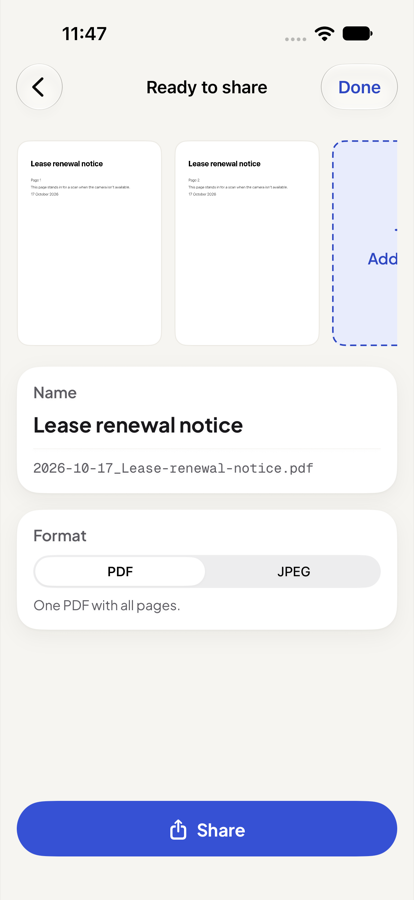
Scan a signed contract, a form or a letter into one clean PDF, named with the date and title, ready to email or AirDrop.
Your files, your way
Receipts are plain PDFs on your phone. Open them, move them, back them up. They're never locked inside the app.
Stays on your phone.
DocketBox has no account and no server. Your receipts and documents are files on your phone, and nothing leaves unless you send it.
On iPhones with Apple Intelligence, item suggestions are made on the phone too. There are no ads and no tracking, and DocketBox never asks for your email address.
Knows your tax rules
DocketBox uses your country's tax name, tax ID, date format and tax year. Choose your country when you set up.
| Country | Tax | Tax ID checked | Tax year |
|---|---|---|---|
| Australia | GST | ABN | 1 July to 30 June |
| New Zealand | GST | GST number | 1 April to 31 March |
| Canada | GST/HST | GST/HST number | 1 January to 31 December |
| United Kingdom | VAT | VAT number | 6 April to 5 April |
| Ireland | VAT | VAT number | 1 January to 31 December |
| Singapore | GST | GST reg. number | 1 January to 31 December |
| United States | Sales tax | None (sales tax isn’t claimed back) | 1 January to 31 December |
See a receipt filed in seconds
From the camera to a named PDF in the right folder, and on its way to Xero.
A short walkthrough of scanning, filing and sending a receipt.
Pay once. Keep it.
Try DocketBox properly on your own receipts, then unlock it with one payment. The price depends on your country.
| Australia | $14.99 AUD |
|---|---|
| United States | $9.99 USD |
| United Kingdom | £9.99 GBP |
| New Zealand | $19.99 NZD |
| Canada | $14.99 CAD |
| Ireland | €9.99 EUR |
| Singapore | S$14.98 SGD |
- Free for your first 10 scans, receipts and documents together
- No subscription, ever
- No ads, no account, no server
- Everything you've saved stays yours to open, share and export
Frequently asked questions
What is DocketBox?
DocketBox is a phone app that scans receipts and documents, names them clearly, files them for tax and sends them where they need to go.
It reads the date, shop, total, tax and supplier tax ID on your phone, then saves a PDF into folders by business, financial year and category. It's available for iPhone, with Android planned.
How much does DocketBox cost?
DocketBox is free for your first 10 scans, then a one-off unlock (from us$9.99). There is no subscription.
The price depends on your country, and the App Store shows it in your currency. Receipts and documents count towards the free scans together.
What happens after the free scans?
After 10 scans, saving new receipts or documents needs the one-off unlock. Everything you've already saved stays yours to open, share and export.
If you reach the limit part-way through a scan, you can still share that scan once without saving it.
Where are my receipts stored?
Your receipts are PDF files on your phone. On iPhone, they are in the DocketBox folder in the Files app.
DocketBox has no server and no account, so nothing is uploaded unless you send it yourself, for example to Xero or your accountant.
Does DocketBox work with Xero, QuickBooks and MYOB?
Yes. DocketBox emails each receipt to the inbox address Xero, QuickBooks, MYOB or Dext gives you, so it arrives as a draft bill.
You can also send receipts to your accountant or bookkeeper, or keep them in the folder only.
Can I use it for more than one business?
Yes. Add each business, and your personal receipts, as separate entities, and each gets its own folders and send-to address.
Is DocketBox on Android?
Not yet. DocketBox is available for iPhone now, and an Android version is planned. This site will link to Google Play when it's ready.
Which countries does DocketBox support?
DocketBox supports Australia, the United States, the United Kingdom, New Zealand, Canada, Ireland and Singapore.
It uses each country's tax name, tax ID, date format and tax year, such as GST and ABN in Australia or VAT and the 6 April tax year in the UK.
Does it work offline?
Yes. Scanning, reading, naming and filing all happen on your phone without an internet connection.
You need a connection only to send a receipt by email or to buy the unlock.
Is DocketBox only for receipts?
No. Document mode scans contracts, forms and letters into one clean PDF, named with the date and title, ready to email, AirDrop or save.
Does DocketBox give tax advice?
No. DocketBox is a filing tool, not tax advice. It flags things worth checking, such as a missing ABN, but you and your accountant decide what to claim.
Does DocketBox use AI?
Optionally, and only on your phone. On iPhones with Apple Intelligence, an on-device model suggests what was bought, such as "Deck screws", for the file name.
The date, total, tax and tax ID always come from rules on the phone, never from AI, and nothing is sent to a server.
Something else? See Support or email support@docketbox.app.